


AI ChatBot Assistant - Cuda AI
4.286.00 Reviews
App Specs
- Version
- 1.0.7
- Updated On
- License
- Free
- Downloads
- 100,000+
- Developer
- Alfinardimen
- Categories
- Business
- Platform
- Android
Screenshots


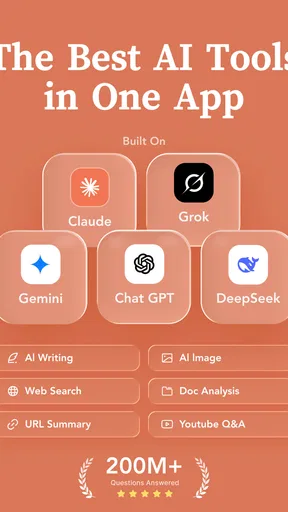
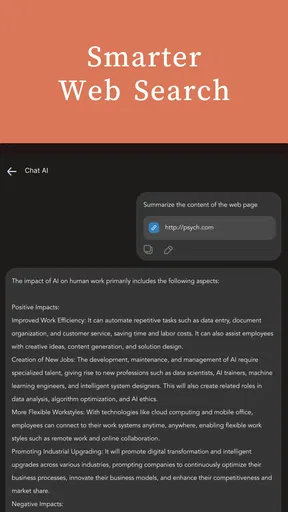
 Analysis by AppCompare
I approach AI ChatBot Assistant - Cuda AI as a place to try several AI chat services without starting from a different app each time. That can be useful when I want a quick draft, an explanation, or a second take on an idea, but it also calls for a little judgment: a convenient answer is not automatically a reliable one. The app is free to install, with optional in-app purchases, so I would treat it as a handy workspace to explore rather than assume every capability comes at no cost.
What the all-in-one approach changes
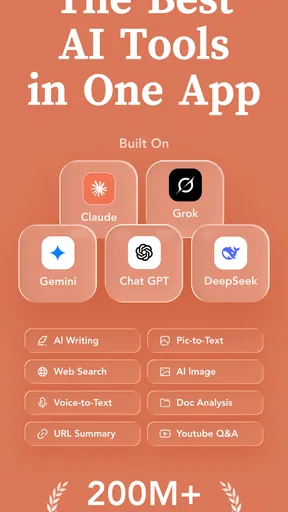
The main appeal is the choice of AI assistants in one app. Cuda AI brings together Claude, ChatGPT, Gemini, Grok, and Deepseek, giving me a practical way to compare responses to the same question. I find that comparison more valuable than simply collecting answers: a brief prompt can reveal which reply is clearest, which one makes a useful assumption, and which one needs a correction. For work that involves wording or brainstorming, that second perspective can save time.
There is a trade-off, though. An all-in-one interface can make switching feel easier, but it does not remove the need to understand what each assistant is good at or to check important claims. If I need a single, consistent place to build a long-running project around one model, using that model’s own app may be more straightforward. Cuda AI makes the most sense to me when flexibility matters more than loyalty to one assistant.
A useful way to compare answers
Instead of asking several assistants a broad question and reading a stack of similar replies, I would give each one the same focused task. For example, I might ask for three ways to explain a complicated idea to a customer, then compare tone and clarity. I can also ask a follow-up that tests whether an answer is actually useful: “What assumption are you making?” or “What could make this advice wrong?” This makes the variety of models a working tool, not just a list of names.
For everyday business writing, I would keep the final decision in my hands. An AI draft can help me get past a blank page, but I would still check names, dates, figures, promises, and any wording that could be read as a commitment. That is especially important if a message is going to a client or colleague. I would avoid pasting confidential business details into any chatbot unless I had checked the relevant privacy terms and was comfortable with them.
Who is likely to get the most from it
I can see this app suiting people who regularly switch between research, idea generation, and writing, and who like comparing different styles before choosing a direction. A freelancer, student, or small-business owner might use it to outline a proposal, simplify a dense paragraph, or generate questions to take into a meeting. Those are useful starting points, not finished work: the person using the output still needs to check facts, adjust the voice, and decide what belongs in the final version.
It is less compelling if you already have a preferred assistant and mainly need its deeper, familiar workflow. It may also be a poor fit if you expect an AI to take actions on your behalf, such as managing a calendar or reliably completing a business process. I would choose a dedicated scheduling or project tool for that job. A chat assistant can help plan the steps, but planning is not the same as carrying them out.
Worth Reading Before You Choose

EA SPORTS FC Mobile 26 Is a Bigger Football Game, but It Takes Time

Flipboard Shows What News Apps Must Do Beyond the Feed

Switching to Android Auto Means Rethinking Your Driving Routine

Google Calendar Makes a Crowded Week Easier to Manage

Ludo King Makes the Most of the Minutes Between Plans

Baby Panda World Brings Quick Play to Modern Phones, but Its Game Library Feels Busy
Price, platform, and practical expectations
Alfinardimen’s business app is free to download, and its optional purchases range from $6.99 to $99.99 per item. I would start with ordinary questions and short drafting tasks before paying for anything, then decide whether the app’s particular mix of assistants fits a real routine. The price range makes it sensible to check what an individual purchase includes in the app before confirming it, rather than assuming every model or use case is covered in the same way.
The app is rated for Everyone and requires Android 6.0 or later. Its current release is version 1.0.4, following its release on January 8, 2026. Those details make the version number worth keeping in perspective: it identifies the release available now, but it does not by itself tell me what changed between releases or guarantee how the app will develop. I would look at the version information when updating and judge any change by whether it improves the tasks I actually use.
Its 4.2 average from around 1,500 ratings and more than 10,000 installs suggest that people have tried it, though those figures alone cannot tell me whether it suits my needs. I would also avoid treating a chatbot response as a source of truth just because it sounds confident. For health, legal, financial, or other high-stakes questions, I would use an appropriate professional source instead. That is not a shortcoming unique to Cuda AI; it is a basic limit of relying on generated answers.
A realistic routine, and a small test before relying on it
Imagine I have a short client update to write before a meeting. I could ask one assistant to turn my rough notes into a clear draft, then ask another to flag anything that sounds vague or overly certain. I would remove sensitive details, verify every factual statement, and rewrite the result so it sounds like me. This is a modest workflow, but it uses the app’s multiple assistants for a real advantage: one can help create, while another helps critique.
For a first session, I would test a low-risk task with a clear answer, then follow up with a request to explain its reasoning or identify uncertainty. I would also try the same prompt in a second assistant and compare the differences rather than assuming one response is best. If the answers are inconsistent, that is a cue to check elsewhere, not to average them into a more confident-sounding guess. This habit is more useful than trying to make the chatbot handle every part of a task.
Where I would draw the line
Having several assistants close at hand can create an illusion of confirmation: if multiple replies agree, it is tempting to treat that as proof. I would resist that, especially when the assistants may share similar limitations or misunderstand the same prompt. For a decision that affects money, customers, or compliance, I would verify independently. I would also be cautious about using conversational output as a substitute for records, approved company guidance, or a specialist’s advice.
Another practical question is whether switching among assistants makes a task simpler or just adds another step. If I only need one quick answer, choosing a model and comparing alternatives may be unnecessary. If I need a polished document, I may be better off drafting in the writing software I already use and bringing the chatbot in only for a specific obstacle. Cuda AI’s value depends on using its range deliberately, not on asking every assistant everything.
With 17 reviews alongside its broader rating count, the public feedback is still a relatively small amount of detailed commentary to draw conclusions from. I would therefore make my own decision through a simple trial: test the prompts I use most, see whether switching assistants genuinely helps, and check the purchase details before spending. If those tests do not improve my routine, a single chatbot or a purpose-built business app is likely the cleaner choice.
If you’re like me, you’ve probably found yourself juggling multiple tasks and wishing for an extra pair of hands. Enter AI ChatBot Assistant - Cuda AI, the app that promises to be your digital assistant, ready to tackle your questions and help manage your daily life. I’ve spent some time exploring this app, and let me tell you, it’s like having a personal assistant in your pocket!
Getting Started with Cuda AI
First things first, getting started with AI ChatBot Assistant - Cuda AI is a breeze. The app is available for both Android and iOS, and the installation process is as straightforward as pie. Once you have it installed, you’re greeted with a clean and intuitive interface that doesn’t overwhelm you with too many options. The design is sleek, modern, and user-friendly, making navigation as smooth as a Sunday morning.
Features That Stand Out
One of the most impressive aspects of Cuda AI is its versatility. It’s not just a chatbot; it’s a powerhouse of productivity tools. Whether you need to set reminders, schedule meetings, or even find quick answers to random trivia, Cuda AI has you covered. Its ability to understand context and provide accurate responses is quite remarkable.
Additionally, the app supports multiple languages, which is a huge plus for non-English speakers. It feels like the developers really thought of everything to make this app accessible to a global audience.
Chatting with Cuda AI
Now, let’s talk about the chatbot feature itself. The AI in Cuda AI is powered by advanced machine learning algorithms, which means it gets better the more you use it. It’s almost like talking to a friend who learns your preferences over time. Whether you’re asking for weather updates or looking for the latest news, Cuda AI responds with speed and accuracy.
One thing I particularly enjoyed was how the chatbot maintains a conversational tone. It’s not just about delivering answers; it engages you with witty remarks and even a bit of humor. It’s these little touches that make interacting with Cuda AI a delightful experience.
Why You’ll Love It
So, why should you give Cuda AI a try? For starters, it’s an incredibly efficient tool for managing everyday tasks. But beyond that, it’s the small things that really make it shine. The app learns from your interactions, adapting to your style and preferences, which means the more you use it, the better it gets.
- Multitasking: It can handle multiple queries at once, saving you precious time.
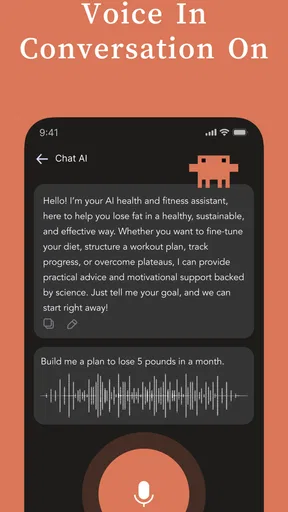
- Accessibility: With voice commands, you can interact with the app even when you’re on the go.
- Customization: Tailor the app settings to suit your needs and preferences.
The Final Verdict
In a world where time is of the essence, AI ChatBot Assistant - Cuda AI steps up as a reliable companion. It’s like having a Swiss Army knife for digital tasks. Whether you’re a busy professional or someone who just loves staying organized, this app is bound to impress you with its functionality and ease of use.
I’ve found it to be a game-changer in my day-to-day routine. The convenience of having a dependable assistant that fits right in your pocket is something you don’t want to miss out on. So, why not give it a whirl? You might just wonder how you ever managed without it!
Pros
- Intuitive user interface for easy navigation.
- Supports multiple languages seamlessly.
- Highly responsive and quick to load.
- Offers customization for a personalized experience.
- Integrates well with other apps.
Cons
- Limited offline functionality available.
- Occasional inaccuracies in responses.
- Premium features are quite costly.
- Requires stable internet for best performance.
- Voice recognition could be improved.
FAQs for AI ChatBot Assistant - Cuda AI
What platforms is Cuda AI available on?
Cuda AI is available on both Android and iOS platforms. Users can download it from the Google Play Store for Android devices and the Apple App Store for iOS devices. The app is designed to run smoothly on most smartphones and tablets, ensuring accessibility for a wide range of users.
What features does Cuda AI offer to enhance user experience?
Cuda AI offers a variety of features designed to improve user interaction, such as natural language processing, voice recognition, and personalized recommendations. It also integrates with other apps and services to provide comprehensive assistance, making it a versatile tool for both personal and professional use.
Is Cuda AI free to use, or does it require a subscription?
Cuda AI offers a free version with basic features. However, for users who want to unlock premium features and enhanced functionalities, a subscription is required. The subscription model is flexible, often including monthly and yearly plans, allowing users to choose based on their needs and budget.
How does Cuda AI handle user data and privacy?
Cuda AI takes user privacy seriously. It employs advanced encryption protocols to protect user data and ensure secure communication. The app's privacy policy is transparent, outlining how data is collected, used, and stored. Users have control over their data, with options to manage and delete their information as needed.
Can Cuda AI be integrated with other applications?
Yes, Cuda AI is designed to integrate seamlessly with a variety of applications and services, enhancing its utility. Whether it’s syncing with your calendar, managing emails, or interfacing with smart home devices, Cuda AI provides a flexible platform that can adapt to different user environments and needs.


